Executor 빠른 시작
패키지 버전
이 페이지의 코드는 다음 요구 사항을 사용하여 개발되었습니다. 이 버전 이상을 사용하는 것을 권장합니다.
qiskit[all]~=2.5.2
qiskit-ibm-runtime~=0.47.0
samplomatic~=0.21.0
# Added by doQumentation — required packages for this notebook
!pip install -q qiskit qiskit-ibm-runtime samplomatic
Sampler Primitive와 유사하게, Executor는 양자 Circuit 실행에서 출력 레지스터를 샘플링하지만 내장된 오류 억제나 완화 기능이 없습니다. 대신, 지향적 실행 모델의 일부로서 클라이언트 측에서 설계 의도를 캡처하고 Circuit 변형의 비용이 많이 드는 생성을 서버 측으로 이동시키는 요소를 제공합니다. Executor는 Circuit 주석과 옵션에서 제공된 지시를 따르고, 매개변수 값을 생성하고 바인딩하며, 바인딩된 Circuit을 하드웨어에서 실행하고, 실행 결과와 메타데이터를 반환합니다. 암묵적인 결정을 내리지 않고 완전한 제어와 투명성을 제공합니다.
Qiskit 패키지에는 아직 Executor Primitive의 기본 클래스가 없습니다.
시작하기 전에
이 페이지의 일부 코드 예제는 Samplomatic 패키지의 일부인 samplex를 사용합니다. 따라서 해당 코드 블록을 실행하기 전에 다음 코드 블록에 표시된 것처럼 Samplomatic을 설치해야 합니다. 자세한 내용은 Samplomatic 문서를 참조하세요.
pip install samplomatic

# For visualization support, include the visualization dependencies.
# pip install samplomatic[vis]
Executor Primitive 사용 단계
1. 계정 초기화
IBM Quantum Compute Service는 관리형 서비스이므로 먼저 계정을 초기화해야 합니다. 그런 다음 기댓값을 계산하는 데 사용할 QPU를 선택할 수 있습니다.
계정이 아직 없는 경우 IBM Cloud® 계정 설정의 단계를 따르세요.
from qiskit_ibm_runtime import QiskitRuntimeService, Executor
from qiskit_ibm_runtime.quantum_program import QuantumProgram
from qiskit.circuit import QuantumCircuit
from qiskit.transpiler import generate_preset_pass_manager
from samplomatic.transpiler import generate_boxing_pass_manager
from samplomatic import build

# Initialize the service and choose a backend
service = QiskitRuntimeService()
backend = service.least_busy(operational=True, simulator=False)
print(backend)
<IBMBackend('ibm_fez')>
2. Circuit 생성 및 트랜스파일
Executor Primitive를 사용하려면 최소 하나의 Circuit이 필요합니다. 선택적으로 매개변수를 가질 수 있습니다.
# Generate the circuit
circuit = QuantumCircuit(2)
circuit.h(0)
circuit.h(1)
circuit.cz(0, 1)
circuit.h(1)

# Using `measure_all` automatically creates the necessary
# classical registers.
circuit.measure_all()
Circuit은 QPU에서 지원되는 명령만 사용하도록 변환되어야 합니다(명령 집합 아키텍처(ISA) Circuit이라고 함). 이를 위해 트랜스파일러를 사용하세요.
# Transpile the circuit
preset_pass_manager = generate_preset_pass_manager(
    backend=backend, optimization_level=0
)
isa_circuit = preset_pass_manager.run(circuit)
3. QuantumProgram 초기화
워크로드로 QuantumProgram을 초기화하세요. QuantumProgram은 QuantumProgramItems로 구성됩니다. 일반적으로 각 항목은 Circuit, 매개변수 값 집합, 그리고 경우에 따라 Circuit 내용을 무작위화하는 samplex로 구성됩니다. 전체 세부 사항은 Executor 입력 및 출력을 참조하세요.
다음 셀은 QuantumProgram을 초기화하고 25번의 샷을 수행하도록 지정합니다. 다음으로, 트랜스파일된 대상 Circuit을 추가합니다.
# Initialize an empty program
program = QuantumProgram(shots=25)

# Append the circuit to the program
program.append_circuit_item(isa_circuit)
4. 선택 사항: Gate와 측정을 주석이 달린 박스로 그룹화
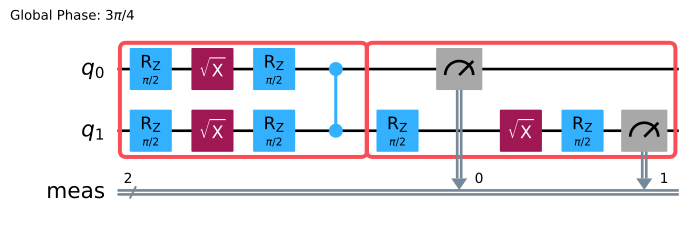
명령을 박스로 그룹화하고 주석을 다는 것이 의도를 지정하는 주요 방법입니다. 다음 예제에서 generate_boxing_pass_manager와 트월링 매개변수를 사용하여 2-qubit Gate와 측정을 박스로 그룹화하고 트월링 주석을 적용합니다.
# Generate a boxing pass manager to group gates
# and measurements into boxes and add
# a`Twirl` annotation.
boxes_pm = generate_boxing_pass_manager(
    # Add gate twirling
    enable_gates=True,
    # Add measurement twirling
    enable_measures=True,
)

boxed_circuit = boxes_pm.run(isa_circuit)
boxed_circuit.draw("mpl", idle_wires=False)
5. 선택 사항: 템플릿 Circuit과 samplex를 빌드하고 프로그램에 추가
다음으로, Samplomatic build 메서드를 사용하여 _템플릿 Circuit_과 samplex 쌍을 생성합니다. 템플릿 Circuit은 원래 Circuit과 구조적으로 동등합니다. 그러나 지정된 주석(이 예제에서는 Gate 및 측정 트월링)을 구현하기 위해 단일 qubit Gate가 매개변수화된 Gate로 대체됩니다. samplex는 템플릿 Circuit에 대한 무작위 매개변수를 생성하는 데 필요한 모든 정보를 인코딩합니다.
템플릿 Circuit과 samplex 쌍을 생성한 후, append_samplex_item 메서드를 사용하여 프로그램에 쌍을 추가합니다.
samplomatic.samplex.Samplex와 그 인수에 대한 전체 세부 사항은 Samplomatic API 문서를 참조하세요.
# Build the template circuit and the samplex
template_circuit, samplex = build(boxed_circuit)

# Append the template circuit and samplex as a `samplex_item`
program.append_samplex_item(
    template_circuit,
    samplex=samplex,
    shape=(num_randomizations := 20,),
)
6. Executor 호출 및 결과 가져오기
기본 옵션으로 Executor Primitive를 사용하여 IBM® 백엔드에서 QuantumProgram을 실행합니다. 사용 가능한 옵션에 대해서는 Executor 옵션을 참조하세요.
# Initialize an Executor with the default options
executor = Executor(mode=backend)

# Submit the job
job = executor.run(program)
job
<RuntimeJobV2('dab7lcrvpcac73ddek40', 'executor')>
# Retrieve the result
result = job.result()
결과는 QuantumProgramResult 유형입니다. 결과 객체에 대한 자세한 내용은 Executor 입력 및 출력을 참조하세요.
다음 단계
- Executor 예제를 시도해 보세요.
- Executor 입력 및 출력을 이해하세요.
- Executor 브로드캐스팅 의미론에 대해 알아보세요.