워크로드에서 사후 선택 사용
패키지 버전
이 페이지의 코드는 다음 요구 사항을 사용하여 개발되었습니다. 이 버전 이상을 사용하는 것을 권장합니다.
qiskit[all]~=2.5.2
qiskit-ibm-runtime~=0.47.0
qiskit-addon-utils~=0.4.0
워크로드의 오류 완화 전략을 최적화할 때, 비마르코프(상관된) 노이즈 프로세스에 의해 오염된 것으로 알려진 측정값을 걸러내는 것이 유용할 수 있습니다. 이를 위한 한 가지 방법은 활성 및 인접한 "관찰자" Qubit을 측정하고, 각 Qubit에 느린 회전을 적용한 다음 다시 측정하는 후처리 단계를 Circuit에 추가하는 것입니다. 두 측정값이 예상대로 반전된 Qubit을 확인하지 않는 경우, 결과에 마스크를 적용하여 해당 샷을 버립니다.
Qiskit addon utilities 패키지는 마스크를 적용하기 위한 트랜스파일러 패스 집합과 사후 선택 함수를 제공합니다. 이 페이지는 4 qubit GHZ 상태를 예제로 사용하여 양자 워크로드에 사후 선택을 통합하는 방법에 대한 안내를 제공합니다.
워크로드 생성
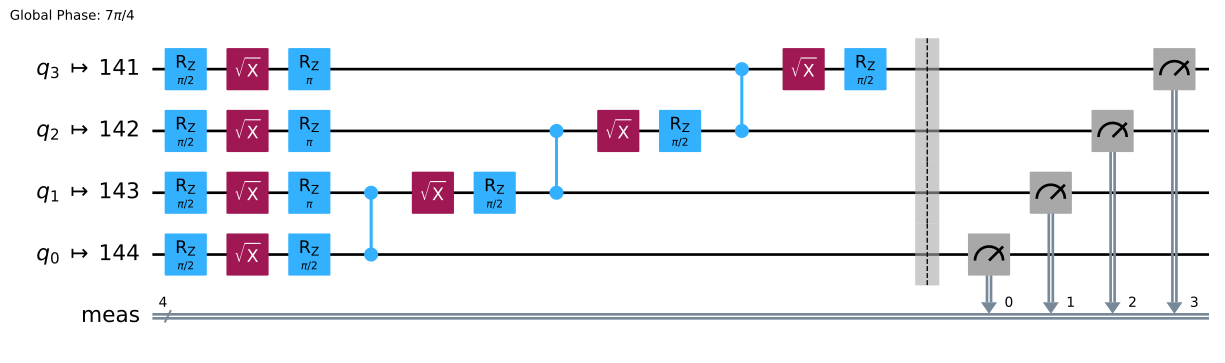
실행할 Circuit을 준비하고 분수 게이트를 지원하는 백엔드에 대해 트랜스파일하는 것으로 시작합니다.
# Added by doQumentation — required packages for this notebook
!pip install -q qiskit qiskit-addon-utils qiskit-ibm-runtime
from qiskit_ibm_runtime import QiskitRuntimeService
from qiskit.circuit import QuantumCircuit
from qiskit.transpiler import generate_preset_pass_manager

circuit = QuantumCircuit(4)
circuit.h(0)
circuit.cx(0, 1)
circuit.cx(1, 2)
circuit.cx(2, 3)
circuit.measure_all()

service = QiskitRuntimeService()
backend = service.least_busy(use_fractional_gates=True)
pm = generate_preset_pass_manager(optimization_level=3, backend=backend)

transpiled_circuit = pm.run(circuit)
transpiled_circuit.draw("mpl")
사후 선택 트랜스파일러 패스 추가
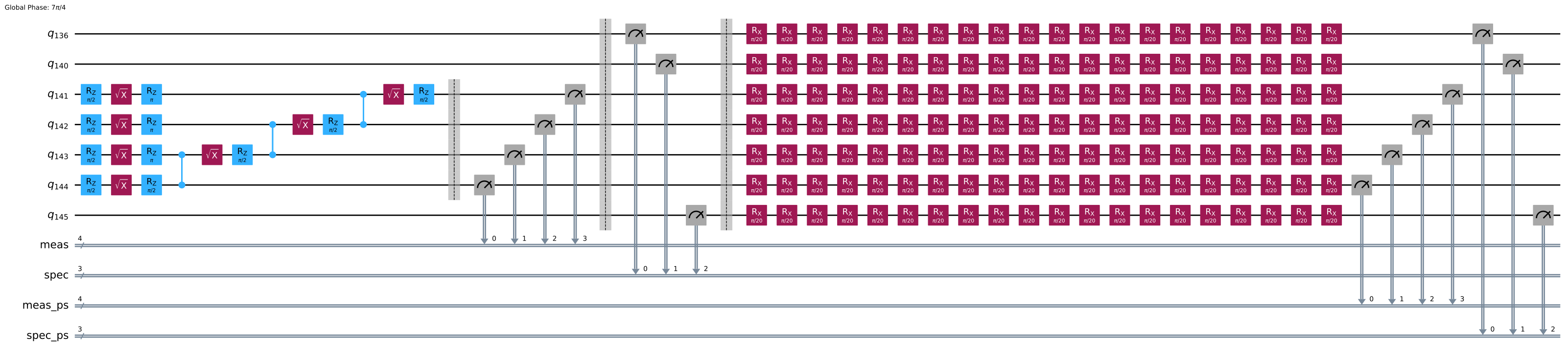
다음으로 qiskit-addon-utils 패키지의 AddPostSelectionMeasures 및 AddSpectatorMeasures 패스를 포함하는 사전 설정 패스 관리자를 만듭니다. 이는 Circuit에 일련의 작은 각도 RX 회전(사실상 긴 X 게이트 생성)과 두 번째 측정 집합을 추가합니다.
from qiskit.transpiler import PassManager
from qiskit_addon_utils.noise_management.post_selection import PostSelector
from qiskit_addon_utils.noise_management.post_selection.transpiler.passes import (
    AddPostSelectionMeasures,
    AddSpectatorMeasures,
)

post_selection_pm = PassManager(
    [
        AddSpectatorMeasures(backend.coupling_map, add_barrier=True),
        AddPostSelectionMeasures(x_pulse_type="rx"),
    ]
)

template_circuit_ps = post_selection_pm.run(transpiled_circuit)
template_circuit_ps.draw("mpl", fold=-1, idle_wires=False)
양자 프로그램 실행
다음으로 실행할 Circuit을 포함하는 QuantumProgram 객체를 준비합니다.
from qiskit_ibm_runtime import QuantumProgram, Executor

shots = 4000

program = QuantumProgram(shots=shots)
program.append_circuit_item(template_circuit_ps)

# Initialize the Executor job and run
executor = Executor(backend)
executor_job = executor.run(program)
print(f"Job ID: {executor_job.job_id()}")
Job ID: dab7lmhl216s739p6q1g
이제 결과를 해석할 수 있습니다. executor 결과는 여러 키를 가진 딕셔너리입니다.
executor_result = executor_job.result()[0]
executor_result.keys()
KeysView(QuantumProgramItemResult({'meas': array([[ True,  True,  True,  True],
       [ True,  True,  True,  True],
       [False, False, False, False],
       ...,
       [ True,  True,  True,  True],
       [ True,  True,  True,  True],
       [False, False, False, False]], shape=(4000, 4)), 'spec': array([[False, False, False],
       [False, False, False],
       [False, False, False],
       ...,
       [False, False, False],
       [False, False, False],
       [False, False, False]], shape=(4000, 3)), 'meas_ps': array([[False, False, False, False],
       [False, False, False, False],
       [ True,  True,  True,  True],
       ...,
       [False, False, False, False],
       [False, False, False, False],
       [False,  True,  True,  True]], shape=(4000, 4)), 'spec_ps': array([[ True,  True,  True],
       [ True,  True,  True],
       [ True,  True,  True],
       ...,
       [ True,  True,  True],
       [ True,  True,  True],
       [ True,  True,  True]], shape=(4000, 3))}, metadata=ItemMetadata()))
이 키들은 rx 명령 전의 활성 및 관찰자 qubit(meas 및 spec)과 rx 명령 후의 qubit(meas_ps 및 spec_ps)에 해당합니다. 이들 각각은 샷 수와 qubit 수를 기반으로 한 배열의 배열입니다. 이 경우 모양은 (1000, 4)입니다.
사후 선택 마스크 생성
이 측정값에서 qiskit-addon-utils의 PostSelector 클래스를 사용하여 마스크를 만들 수 있습니다. 이 마스크는 두 가지 사후 선택 전략 중 하나를 기반으로 각 샷이 True 또는 False로 표시되는 불리언 배열입니다. 첫 번째 전략인 node는 qubit 정보를 사용하여 측정 샷을 버릴지 결정하고, 두 번째 전략인 edge는 최근접 이웃 연결 정보를 사용하여 이 결정을 합니다.
post_selector = PostSelector.from_circuit(
    circuit=template_circuit_ps, coupling_map=backend.coupling_map
)

mask_node = post_selector.compute_mask(executor_result, strategy="node")
mask_edge = post_selector.compute_mask(executor_result, strategy="edge")
노드와 엣지 전략 모두 종종 다른 샷을 버립니다. 원하는 것을 선택할 수 있습니다. 이 노트북은 비트 단위 AND를 사용하는데, 이는 노드 및 엣지 전략 모두를 통과한 경우에만 샷을 유지하는 보수적인 전략입니다.
mask = mask_node & mask_edge
print(f"The combined mask: {mask}")
count_retained = 0

for m in mask:
    count_retained += m

print(
    f"Percentage of the shots retained is after post selection "
    f"{100 * count_retained / shots}"
)
The combined mask: [ True  True  True ...  True  True False]
Percentage of the shots retained is after post selection 83.3
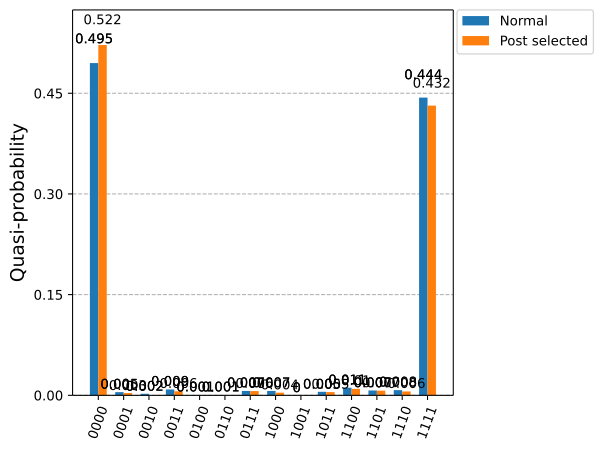
사후 선택 전후의 확률 분포를 비교합니다. 다음 스니펫은 사후 선택 전후의 확률 분포와 측정 분포와 이상적인 분포 간의 거리를 계산합니다.
counts = {}
counts_ps = {}

for idx, measurement in enumerate(executor_result["meas"]):
    bitstring = ""
    for bit in measurement:
        bitstring += str(int(bit))

    if bitstring in counts:
        counts[bitstring] += 1
    else:
        counts[bitstring] = 1

    # Compute count data for postselected shots based on the mask
    if mask[idx]:
        bitstring = ""
        for bit in measurement:
            bitstring += str(int(bit))

        if bitstring in counts_ps:
            counts_ps[bitstring] += 1
        else:
            counts_ps[bitstring] = 1

for key, val in counts.items():
    counts[key] = val / shots

for key, val in counts_ps.items():
    counts_ps[key] = float(val / count_retained)
사후 선택이 결과를 어떻게 변경했는지 보여주기 위해 이상적인 확률 분포와 측정된 분포 간의 거리를 계산합니다.
import itertools
from qiskit.visualization import plot_histogram

bitstrings = ["".join(i) for i in itertools.product("01", repeat=4)]
counts_ideal = {}
for bitstring in bitstrings:
    counts_ideal[bitstring] = 0.0
counts_ideal["1111"] = 0.5
counts_ideal["0000"] = 0.5

prob_distance = 0.0
prob_distance_ps = 0.0

for bitstring in counts_ideal.keys():
    dist = 0.0
    dist_ps = 0.0
    if bitstring in counts:
        dist = abs(counts[bitstring] - counts_ideal[bitstring])
    if bitstring in counts_ps:
        dist_ps = abs(counts_ps[bitstring] - counts_ideal[bitstring])
    prob_distance += dist
    prob_distance_ps += dist_ps

print(
    f"Distance from ideal distribution before postselection: "
    f"{1-prob_distance*0.5}"
)
print(
    f"Distance from ideal distribution before after-selection: "
    f"{1-prob_distance_ps*0.5}"
)

plot_histogram([counts, counts_ps], legend=["Normal", "Post selected"])
Distance from ideal distribution before postselection: 0.9385
Distance from ideal distribution before after-selection: 0.9315726290516206
사후 선택은 비마르코프 노이즈의 영향을 받은 결과 측정값을 걸러냄으로써 결과 품질을 크게 향상시킬 수 있지만, 그 자체로는 오류 완화의 완전한 해결책이 아닙니다. 사후 선택은 유효하지 않은 측정 결과를 버려 특정 오류의 영향을 줄이지만, 이는 샘플링 오버헤드 증가라는 비용이 따르며 근기 양자 하드웨어에 존재하는 모든 오류 메커니즘을 해결하지는 않습니다. 따라서 더 복잡하거나 깊은 Circuit의 경우 사후 선택에만 의존하는 것은 충분하지 않을 수 있습니다. 대신, 사후 선택은 측정 오류 완화, 노이즈 인식 Circuit 컴파일, 확률적 오류 소거와 같은 기법을 보완하여 정확도와 리소스 비용의 균형을 유지하면서 양자 워크로드의 신뢰성을 향상시키는 더 광범위한 오류 완화 전략의 일부로 사용할 때 가장 효과적입니다.
다음 단계
- 양자 워크로드에 노이즈 학습을 통합하는 방법을 이해하세요.
- 사용 가능한 다른 오류 완화 및 억제 기법을 읽어보세요.
- 오류 감지에 대한 낮은 오버헤드 접근 방식을 위해 시공간 코드를 사용하는 방법을 알아보세요.