프리미티브 입력 및 출력
패키지 버전
이 페이지의 코드는 다음 요구 사항을 사용하여 개발되었습니다. 이 버전 이상을 사용하는 것이 좋습니다.
qiskit[all]~=2.5.2
이 페이지에서는 Qiskit SDK Primitive의 입력과 출력에 대한 개요를 제공합니다. 이러한 Primitive를 사용하면 **Primitive Unified Bloc (PUB)**이라는 데이터 구조를 사용하여 벡터화된 워크로드를 효율적으로 정의할 수 있습니다. 이러한 PUB는 워크로드 실행의 기본 작업 단위입니다. PUB는 Sampler 및 Estimator Primitive의 run() 메서드에 입력으로 사용되며, 이는 정의된 워크로드를 작업(job)으로 실행합니다. 그런 다음 작업이 완료되면 사용된 PUB와 지정된 옵션에 따라 결과가 반환됩니다.
PUB 개요
프리미티브의 run() 메서드를 호출할 때 필요한 주요 인수는 하나 이상의 튜플로 구성된 list입니다. 각 튜플은 프리미티브가 실행하는 Circuit에 해당합니다. 이 튜플 각각이 PUB이며, 목록의 각 튜플에 필요한 요소는 사용하는 프리미티브에 따라 다릅니다. 이 튜플에 제공되는 데이터는 브로드캐스팅을 통해 워크로드의 유연성을 제공하기 위해 다양한 형태로 배열될 수도 있습니다. 브로드캐스팅 규칙은 이후 섹션에서 설명합니다.
Estimator PUB
Estimator 프리미티브의 경우 PUB 형식에는 최대 네 가지 값이 포함되어야 합니다.
- 하나 이상의
Parameter객체를 포함할 수 있는 단일QuantumCircuit - 추정할 기댓값을 지정하는 하나 이상의 관측값(observable) 목록. 배열로 배치됩니다(예: 단일 관측값은 0차원 배열, 관측값 목록은 1차원 배열 등). 데이터는
Pauli,SparsePauliOp,PauliList, 또는str과 같은ObservablesArrayLike형식 중 하나일 수 있습니다.참고동일한 Circuit을 가진 서로 다른 PUB에 두 개의 가환(commuting) 관측값이 있는 경우, 동일한 측정을 사용하여 추정되지 않습니다. 각 PUB는 측정의 서로 다른 기저(basis)를 나타내므로, 각 PUB에 대해 별도의 측정이 필요합니다. 가환 관측값이 동일한 측정을 사용하여 추정되도록 하려면, 동일한 PUB 내에 그룹화해야 합니다.
- Circuit에 바인딩할 파라미터 값 컬렉션. 마지막 인덱스가 Circuit의
Parameter객체에 대한 단일 배열형 객체로 지정하거나, Circuit에Parameter객체가 없는 경우 생략(또는 동등하게None으로 설정)할 수 있습니다. - (선택 사항) 추정할 기댓값의 목표 정밀도
Sampler PUB
Sampler 프리미티브의 경우 PUB 튜플 형식에는 최대 세 가지 값이 포함됩니다.
- 하나 이상의
Parameter객체를 포함할 수 있는 단일QuantumCircuit참고: 이 Circuit에는 샘플링할 각 Qubit에 대한 측정 명령이 반드시 포함되어야 합니다. - Circuit에 바인딩할 파라미터 값 컬렉션 (런타임에 바인딩해야 하는
Parameter객체가 사용된 경우에만 필요) - (선택 사항) Circuit을 측정할 샷(shot) 수
다음 코드는 Estimator 프리미티브에 대한 벡터화된 입력 예시를 보여줍니다.
# Added by doQumentation — required packages for this notebook
!pip install -q numpy qiskit
from qiskit.circuit import (
    Parameter,
    QuantumCircuit,
    ClassicalRegister,
    QuantumRegister,
)
from qiskit.transpiler import generate_preset_pass_manager
from qiskit.quantum_info import SparsePauliOp
from qiskit.primitives.containers import BitArray
from qiskit.primitives import StatevectorEstimator

import numpy as np

# Define a circuit with two parameters.
circuit = QuantumCircuit(2)
circuit.h(0)
circuit.cx(0, 1)
circuit.ry(Parameter("a"), 0)
circuit.rz(Parameter("b"), 0)
circuit.cx(0, 1)
circuit.h(0)

# Transpile the circuit without providing a backend
pm = generate_preset_pass_manager(optimization_level=1)
transpiled_circuit = pm.run(circuit)
layout = transpiled_circuit.layout

# Now define a sweep over parameter values, the last axis of dimension 2 is
# for the two parameters "a" and "b"
params = np.vstack(
    [
        np.linspace(-np.pi, np.pi, 10),
        np.linspace(-4 * np.pi, 4 * np.pi, 10),
    ]
).T

# Define three observables. The inner length-1 lists cause this array of
# observables to have shape (3, 1), rather than shape (3,) if they were
# omitted.
observables = [
    [SparsePauliOp(["XX", "IY"], [0.5, 0.5])],
    [SparsePauliOp("XX")],
    [SparsePauliOp("IY")],
]
# Apply the same layout as the transpiled circuit.
observables = [
    [observable.apply_layout(layout) for observable in observable_set]
    for observable_set in observables
]

# Estimate the expectation value for all 300 combinations of observables
# and parameter values, where the pub result will have shape (3, 100).
#
# This shape is due to our array of parameter bindings having shape
# (100, 2), combined with our array of observables having shape (3, 1).
estimator = StatevectorEstimator()
estimator_pub = (transpiled_circuit, observables, params)

# Run the transpiled circuit
# using the set of parameters and observables.

job = estimator.run([estimator_pub])
result = job.result()
브로드캐스팅 규칙
PUB는 NumPy와 동일한 브로드캐스팅 규칙에 따라 여러 배열(관측값 및 파라미터 값)의 요소를 집계합니다. 이 섹션에서는 해당 규칙을 간략하게 요약합니다. 자세한 설명은 NumPy 브로드캐스팅 규칙 문서를 참조하세요.
규칙:
-
입력 배열의 차원 수가 동일할 필요는 없습니다.
-
결과 배열은 가장 큰 차원을 가진 입력 배열과 동일한 차원 수를 갖습니다.
-
각 차원의 크기는 해당 차원의 가장 큰 크기입니다.
-
누락된 차원은 크기가 1인 것으로 가정합니다.
-
-
형태 비교는 가장 오른쪽 차원에서 시작하여 왼쪽으로 진행합니다.
-
두 차원의 크기가 같거나 그 중 하나가 1이면 호환됩니다.
브로드캐스팅되는 배열 쌍의 예:
A1     (1d array):      1
A2     (2d array):  3 x 5
Result (2d array):  3 x 5

A1     (3d array):  11 x 2 x 7
A2     (3d array):  11 x 1 x 7
Result (3d array):  11 x 2 x 7
브로드캐스팅되지 않는 배열 쌍의 예:
A1     (1d array):  5
A2     (1d array):  3

A1     (2d array):      2 x 1
# The following would work if the middle dimension were 2,
# instead of 5.
A2     (3d array):  6 x 5 x 4
Estimator는 브로드캐스팅된 형태의 각 요소에 대해 하나의 기댓값 추정치를 반환합니다.
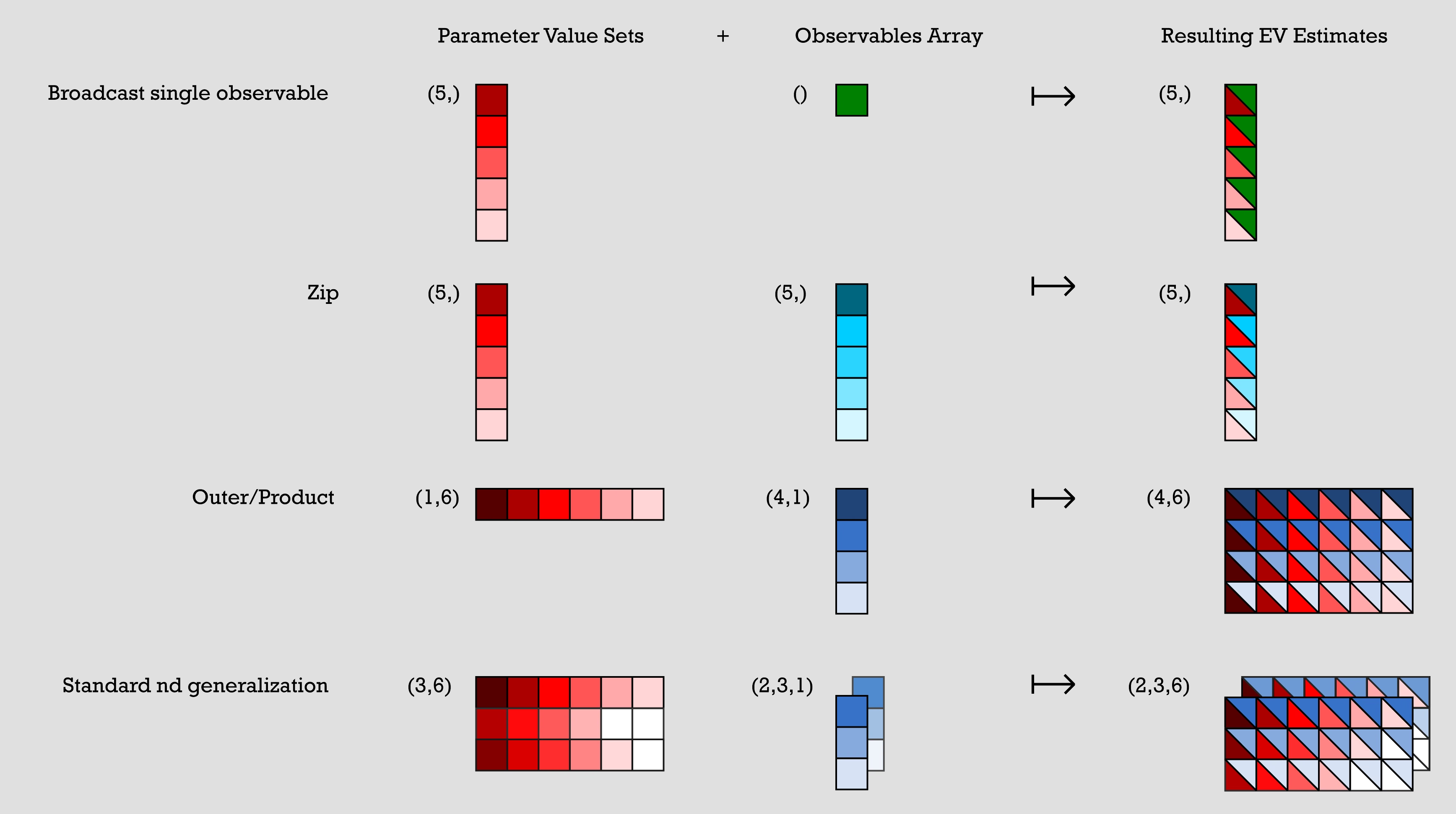
다음은 배열 브로드캐스팅으로 표현된 일반적인 패턴의 몇 가지 예입니다. 아래 그림에서 이에 대한 시각적 표현을 확인할 수 있습니다.
파라미터 값 세트는 n x m 배열로, 관측값 배열은 하나 이상의 단일 열 배열로 표현됩니다. 이전 코드의 각 예시에서 파라미터 값 세트는 관측값 배열과 결합하여 결과 기댓값 추정치를 생성합니다.
-
예시 1: (단일 관측값 브로드캐스팅) 파라미터 값 세트는 5x1 배열이고 관측값 배열은 1x1 배열입니다. 관측값 배열의 항목 하나가 파라미터 값 세트의 각 항목과 결합되어, 원래 파라미터 값 세트의 항목과 관측값 배열의 항목의 조합으로 이루어진 단일 5x1 배열이 생성됩니다.
-
예시 2: (zip) 5x1 파라미터 값 세트와 5x1 관측값 배열이 있습니다. 출력은 파라미터 값 세트의 n번째 항목과 관측값 배열의 n번째 항목이 결합된 5x1 배열입니다.
-
예시 3: (외적/곱) 1x6 파라미터 값 세트와 4x1 관측값 배열이 있습니다. 이들의 조합은 파라미터 값 세트의 각 항목이 관측값 배열의 모든 항목과 결합되어 생성된 4x6 배열이며, 따라서 각 파라미터 값은 출력에서 전체 열이 됩니다.
-
예시 4: (표준 n차원 일반화) 3x6 파라미터 값 세트 배열과 두 개의 3x1 관측값 배열이 있습니다. 이들은 이전 예시와 유사한 방식으로 결합하여 두 개의 3x6 출력 배열을 만들어냅니다.
# Broadcast single observable
parameter_values = np.random.uniform(size=(5,))  # shape (5,)
observables = SparsePauliOp("ZZZ")  # shape ()
# >> pub result has shape (5,)

# Zip
parameter_values = np.random.uniform(size=(5,))  # shape (5,)
observables = [
    SparsePauliOp(pauli) for pauli in ["III", "XXX", "YYY", "ZZZ", "XYZ"]
]  # shape (5,)
# >> pub result has shape (5,)

# Outer/Product
parameter_values = np.random.uniform(size=(1, 6))  # shape (1, 6)
observables = [
    [SparsePauliOp(pauli)] for pauli in ["III", "XXX", "YYY", "ZZZ"]
]  # shape (4, 1)
# >> pub result has shape (4, 6)

# Standard nd generalization
parameter_values = np.random.uniform(size=(3, 6))  # shape (3, 6)
observables = [
    [
        [SparsePauliOp(["XII"])],
        [SparsePauliOp(["IXI"])],
        [SparsePauliOp(["IIX"])],
    ],
    [
        [SparsePauliOp(["ZII"])],
        [SparsePauliOp(["IZI"])],
        [SparsePauliOp(["IIZ"])],
    ],
]  # shape (2, 3, 1)
# >> pub result has shape (2, 3, 6)
각 SparsePauliOp는 SparsePauliOp에 포함된 Pauli의 수에 관계없이 이 맥락에서 단일 요소로 계산됩니다. 따라서 이 브로드캐스팅 규칙의 목적상 다음 요소들은 모두 동일한 형태를 가집니다.
a = SparsePauliOp("Z") # shape ()
b = SparsePauliOp("IIIIZXYIZ") # shape ()
c = SparsePauliOp.from_list(["XX", "XY", "IZ"]) # shape ()
다음 연산자 목록들은 포함된 정보 측면에서는 동일하지만, 형태가 다릅니다:
list1 = SparsePauliOp.from_list(["XX", "XY", "IZ"])
# list1 has shape ()
list2 = [SparsePauliOp("XX"), SparsePauliOp("XY"), SparsePauliOp("IZ")]
# list2 has shape (3, )
프리미티브 출력 개요
하나 이상의 PUB가 실행을 위해 QPU로 전송되고 작업이 성공적으로 완료되면, 데이터는 PrimitiveResult 컨테이너 객체로 반환됩니다. PrimitiveResult는 각 PUB의 실행 결과를 포함하는 PubResult 객체의 반복 가능한 리스트를 포함합니다. 예를 들어, 20개의 PUB로 제출된 작업은 20개의 PubResults로 구성된 리스트를 포함하는 PrimitiveResult 객체를 반환하며, 각 PubResult는 하나의 PUB에 대응합니다.
각 PubResult 객체는 data 속성과 선택적 metadata 속성을 가집니다. data 속성은 Estimator의 경우 기댓값 추정치를, Sampler의 경우 Circuit 출력의 샘플을 포함하는 사용자 정의 DataBin입니다.
data 속성에는 표준 편차와 같은 구현별 추가 정보도 포함될 수 있습니다. metadata 속성에는 연관된 PUB의 실행에 관한 구현별 추가 정보가 포함될 수 있습니다.
다음은 PrimitiveResult 데이터 구조를 시각적으로 나타낸 개요입니다:
- Estimator output
- Sampler output
└── PrimitiveResult
    ├── PubResult[0]
    │   ├── metadata
    │   └── data  ## In the form of a DataBin object,
    |       |     ## which includes data such as the following:
    │       ├── evs
    │       │   └── List of estimated expectation values in the shape
    |       |         specified by the first pub
    │       └── stds
    │           └── List of calculated standard deviations in the
    |                 same shape as above
    ├── PubResult[1]
    |   ├── metadata
    |   └── data  ## In the form of a DataBin object,
    |       |     ## which includes data such as the following:
    |       ├── evs
    |       │   └── List of estimated expectation values in the shape
    |       |        specified by the second pub
    |       └── stds
    |           └── List of calculated standard deviations in the
    |                same shape as above
    ├── ...
    ├── ...
    └── ...
위는 반환될 수 있는 데이터의 예시입니다. 실제 반환되는 데이터는 구현에 따라 다릅니다.
└── PrimitiveResult
    ├── PubResult[0]
    │   ├── metadata
    │   └── data  ## In the form of a DataBin object
    │       ├── NAME_OF_CLASSICAL_REGISTER
    │       │   └── BitArray of count data for first PUB (default is 'meas')
    |       |
    │       └── NAME_OF_ANOTHER_CLASSICAL_REGISTER
    │           └── BitArray of count data (exists only if more than one
    |                 ClassicalRegister was specified in the circuit)
    ├── PubResult[1]
    |   ├── metadata
    |   └── data  ## In the form of a DataBin object
    |       └── NAME_OF_CLASSICAL_REGISTER
    |           └── BitArray of count data for second PUB
    ├── ...
    ├── ...
    └── ...
Estimator 출력
앞서 설명한 바와 같이, Estimator 프리미티브의 PubResult에 반환되는 데이터는 구현에 따라 다릅니다. 예를 들어, 기댓값 배열(PubResult.data.evs)과 관련 표준 편차(PubResult.data.stds)가 포함될 수 있습니다.
아래 코드 스니펫은 위에서 생성된 작업에 대한 PrimitiveResult(및 관련 PubResult) 형식을 설명합니다.
print(
    f"The result of the submitted job had {len(result)} PUB and "
    f"has a value:\n {result}\n"
)
print(
    f"The associated PubResult of this job has the following data bins:"
    f"\n {result[0].data}\n"
)
print(f"And this DataBin has attributes: {result[0].data.keys()}")
print(
    "Recall that this shape is due to our array of parameter binding sets "
    "having shape (100, 2) -- where 2 is the number of parameters in the circuit -- "
    "combined with our array of observables having shape (3, 1)."
)

print(
    f"The expectation values measured from this PUB are: \n{result[0].data.evs}"
)
The result of the submitted job had 1 PUB and has a value:
 PrimitiveResult([PubResult(data=DataBin(evs=np.ndarray(<shape=(3, 10), dtype=float64>), stds=np.ndarray(<shape=(3, 10), dtype=float64>), shape=(3, 10)), metadata={'target_precision': 0.0, 'circuit_metadata': {}})], metadata={'version': 2})

The associated PubResult of this job has the following data bins:
 DataBin(evs=np.ndarray(<shape=(3, 10), dtype=float64>), stds=np.ndarray(<shape=(3, 10), dtype=float64>), shape=(3, 10))

And this DataBin has attributes: dict_keys(['evs', 'stds'])
Recall that this shape is due to our array of parameter binding sets having shape (100, 2) -- where 2 is the number of parameters in the circuit -- combined with our array of observables having shape (3, 1).
The expectation values measured from this PUB are:
[[ 3.06161700e-16  4.52395120e-01  4.36594428e-01  2.16506351e-01
   6.33718361e-01 -6.33718361e-01 -2.16506351e-01 -4.36594428e-01
  -4.52395120e-01 -3.06161700e-16]
 [ 1.22464680e-16  6.42787610e-01  9.84807753e-01  8.66025404e-01
   3.42020143e-01 -3.42020143e-01 -8.66025404e-01 -9.84807753e-01
  -6.42787610e-01 -1.22464680e-16]
 [ 4.89858720e-16  2.62002630e-01 -1.11618897e-01 -4.33012702e-01
   9.25416578e-01 -9.25416578e-01  4.33012702e-01  1.11618897e-01
  -2.62002630e-01 -4.89858720e-16]]
Sampler 출력
Sampler 작업이 성공적으로 완료되면, 반환되는 PrimitiveResult 객체에는 PUB별로 하나씩 SamplerPubResult 목록이 포함됩니다. 이 SamplerPubResult 객체의 데이터 빈(data bin)은 Circuit의 각 ClassicalRegister마다 하나의 BitArray를 포함하는 딕셔너리 유사 객체입니다.
BitArray 클래스는 순서가 있는 샷(shot) 데이터를 담는 컨테이너입니다. 더 자세히 설명하면, 샘플링된 비트 문자열을 2차원 배열 내에 바이트 형태로 저장합니다. 이 배열의 가장 왼쪽 축은 순서가 있는 샷에 걸쳐 있으며, 가장 오른쪽 축은 바이트에 걸쳐 있습니다.
첫 번째 예시로, 다음 10-Qubit Circuit을 살펴보겠습니다.
from qiskit.primitives import StatevectorSampler

# generate a ten-qubit GHZ circuit
circuit = QuantumCircuit(10)
circuit.h(0)
circuit.cx(range(0, 9), range(1, 10))

# append measurements with the `measure_all` method
circuit.measure_all()

# transpile the circuit
transpiled_circuit = pm.run(circuit)

sampler = StatevectorSampler()

# run the Sampler job and retrieve the results

job = sampler.run([transpiled_circuit])
result = job.result()

# the data bin contains one BitArray
data = result[0].data
print(f"Databin: {data}\n")

# to access the BitArray, use the key "meas", which is the default name of
# the classical register when this is added by the `measure_all` method
array = data.meas
print(f"BitArray: {array}\n")
print(f"The shape of register `meas` is {data.meas.array.shape}.\n")
print(f"The bytes in register `alpha`, shot by shot:\n{data.meas.array}\n")
Databin: DataBin(meas=BitArray(<shape=(), num_shots=1024, num_bits=10>))

BitArray: BitArray(<shape=(), num_shots=1024, num_bits=10>)

The shape of register `meas` is (1024, 2).

The bytes in register `alpha`, shot by shot:
[[  3 255]
 [  0   0]
 [  3 255]
 ...
 [  0   0]
 [  3 255]
 [  0   0]]
BitArray의 바이트 형식에서 비트 문자열로 변환하면 편리한 경우가 있습니다. get_count 메서드는 비트 문자열을 해당 비트 문자열이 등장한 횟수에 매핑하는 딕셔너리를 반환합니다.
# optionally convert the native BitArray format to a dictionary format
counts = data.meas.get_counts()
print(f"Counts: {counts}")
Counts: {'1111111111': 484, '0000000000': 540}
Circuit에 둘 이상의 고전 레지스터가 포함된 경우, 결과는 서로 다른 BitArray 객체에 저장됩니다. 다음 예시는 이전 코드를 수정하여 고전 레지스터를 두 개의 별도 레지스터로 분리합니다.
# generate a ten-qubit GHZ circuit with two classical registers
circuit = QuantumCircuit(
    qreg := QuantumRegister(10),
    alpha := ClassicalRegister(1, "alpha"),
    beta := ClassicalRegister(9, "beta"),
)
circuit.h(0)
circuit.cx(range(0, 9), range(1, 10))

# append measurements with the `measure_all` method
circuit.measure([0], alpha)
circuit.measure(range(1, 10), beta)

# transpile the circuit
transpiled_circuit = pm.run(circuit)

# run the Sampler job and retrieve the results

job = sampler.run([transpiled_circuit])
result = job.result()

# the data bin contains two BitArrays, one per register, and can be accessed
# as attributes using the registers' names
data = result[0].data
print(f"BitArray for register 'alpha': {data.alpha}")
print(f"BitArray for register 'beta': {data.beta}")
BitArray for register 'alpha': BitArray(<shape=(), num_shots=1024, num_bits=1>)
BitArray for register 'beta': BitArray(<shape=(), num_shots=1024, num_bits=9>)
효율적인 후처리를 위한 BitArray 객체 활용
일반적으로 배열은 딕셔너리에 비해 더 나은 성능을 제공하므로, 카운트 딕셔너리보다 BitArray 객체에서 직접 후처리를 수행하는 것이 좋습니다. BitArray 클래스는 일반적인 후처리 작업을 수행하기 위한 다양한 메서드를 제공합니다.
print(f"The shape of register `alpha` is {data.alpha.array.shape}.")
print(f"The bytes in register `alpha`, shot by shot:\n{data.alpha.array}\n")

print(f"The shape of register `beta` is {data.beta.array.shape}.")
print(f"The bytes in register `beta`, shot by shot:\n{data.beta.array}\n")

# post-select the bitstrings of `beta` based on having sampled "1" in `alpha`
mask = data.alpha.array == "0b1"
ps_beta = data.beta[mask[:, 0]]
print(f"The shape of `beta` after post-selection is {ps_beta.array.shape}.")
print(f"The bytes in `beta` after post-selection:\n{ps_beta.array}")

# get a slice of `beta` to retrieve the first three bits
beta_sl_bits = data.beta.slice_bits([0, 1, 2])
print(
    f"The shape of `beta` after bit-wise slicing is {beta_sl_bits.array.shape}."
)
print(f"The bytes in `beta` after bit-wise slicing:\n{beta_sl_bits.array}\n")

# get a slice of `beta` to retrieve the bytes of the first five shots
beta_sl_shots = data.beta.slice_shots([0, 1, 2, 3, 4])
print(
    f"The shape of `beta` after shot-wise slicing is {beta_sl_shots.array.shape}."
)
print(
    f"The bytes in `beta` after shot-wise slicing:\n{beta_sl_shots.array}\n"
)

# calculate the expectation value of diagonal operators on `beta`
ops = [SparsePauliOp("ZZZZZZZZZ"), SparsePauliOp("IIIIIIIIZ")]
exp_vals = data.beta.expectation_values(ops)
for o, e in zip(ops, exp_vals):
    print(f"Exp. val. for observable `{o}` is: {e}")

# concatenate the bitstrings in `alpha` and `beta` to "merge" the results
# of the two registers
merged_results = BitArray.concatenate_bits([data.alpha, data.beta])
print(f"\nThe shape of the merged results is {merged_results.array.shape}.")
print(f"The bytes of the merged results:\n{merged_results.array}\n")
The shape of register `alpha` is (1024, 1).
The bytes in register `alpha`, shot by shot:
[[1]
 [1]
 [0]
 ...
 [1]
 [0]
 [1]]

The shape of register `beta` is (1024, 2).
The bytes in register `beta`, shot by shot:
[[  1 255]
 [  1 255]
 [  0   0]
 ...
 [  1 255]
 [  0   0]
 [  1 255]]

The shape of `beta` after post-selection is (0, 2).
The bytes in `beta` after post-selection:
[]
The shape of `beta` after bit-wise slicing is (1024, 1).
The bytes in `beta` after bit-wise slicing:
[[7]
 [7]
 [0]
 ...
 [7]
 [0]
 [7]]

The shape of `beta` after shot-wise slicing is (5, 2).
The bytes in `beta` after shot-wise slicing:
[[  1 255]
 [  1 255]
 [  0   0]
 [  0   0]
 [  1 255]]

Exp. val. for observable `SparsePauliOp(['ZZZZZZZZZ'],
              coeffs=[1.+0.j])` is: -0.02734375
Exp. val. for observable `SparsePauliOp(['IIIIIIIIZ'],
              coeffs=[1.+0.j])` is: -0.02734375

The shape of the merged results is (1024, 2).
The bytes of the merged results:
[[  3 255]
 [  3 255]
 [  0   0]
 ...
 [  3 255]
 [  0   0]
 [  3 255]]
결과 메타데이터
실행 결과 외에도, PrimitiveResult 및 PubResult 객체는 제출된 작업에 관한 선택적 메타데이터 속성을 포함합니다. 반환되는 메타데이터(있는 경우)는 구현별로 다릅니다.
# Print out the results metadata
print("The metadata of the PrimitiveResult is:")
for key, val in result.metadata.items():
    print(f"'{key}' : {val},")

print("\nThe metadata of the PubResult result is:")
for key, val in result[0].metadata.items():
    print(f"'{key}' : {val},")
The metadata of the PrimitiveResult is:
'version' : 2,

The metadata of the PubResult result is:
'shots' : 1024,
'circuit_metadata' : {},
다음 단계
-
Qiskit SDK 프리미티브 API를 검토하세요.
-
Qiskit Aer 프리미티브 API를 검토하세요.
-
IBM Quantum 프리미티브에 대해 자세히 알아보세요.
-
qiskit-ibm-runtimeEstimator API를 검토하세요. -
qiskit-ibm-runtimeSampler API를 검토하세요.