결과 시각화
패키지 버전
이 페이지의 코드는 아래 요구 사항을 사용하여 개발되었습니다. 해당 버전 이상을 사용하는 것을 권장합니다.
qiskit[all]~=2.5.2
히스토그램 플롯
plot_histogram 함수는 QPU에서 양자 Circuit을 샘플링한 결과를 시각화합니다.
이 함수는 matplotlib.Figure 객체를 반환합니다. 코드 셀의 마지막 줄에서 이 객체를 출력하면 Jupyter 노트북에서 셀 아래에 표시됩니다. 다른 환경이나 스크립트에서 이 함수를 호출하는 경우에는 출력을 명시적으로 표시하거나 저장해야 합니다.
두 가지 옵션이 있습니다:
- 반환된 객체에서
.show()를 호출하면 새 창에서 이미지를 열 수 있습니다(설정된 matplotlib 백엔드가 인터랙티브한 경우에 해당). .savefig("out.png")를 호출하면 현재 작업 디렉터리에out.png로 그림을 저장합니다.savefig()메서드는 경로를 인수로 받으므로 출력을 저장할 위치와 파일 이름을 조정할 수 있습니다. 예를 들어plot_state_city(psi).savefig("out.png")와 같이 사용합니다.
예를 들어, 2-Qubit Bell 상태를 만들어 봅니다:
# Added by doQumentation — required packages for this notebook
!pip install -q matplotlib numpy qiskit
from qiskit.primitives import StatevectorSampler as Sampler
from qiskit.transpiler import generate_preset_pass_manager

from qiskit.circuit import QuantumCircuit
from qiskit.visualization import plot_histogram
# Quantum circuit to make a Bell state
bell = QuantumCircuit(2)
bell.h(0)
bell.cx(0, 1)
bell.measure_all()

pm = generate_preset_pass_manager(optimization_level=1)
isa_circuit = pm.run(bell)

# execute the quantum circuit
sampler = Sampler()
job = sampler.run([isa_circuit])
result = job.result()

print(result)
PrimitiveResult([SamplerPubResult(data=DataBin(meas=BitArray(<shape=(), num_shots=1024, num_bits=2>)), metadata={'shots': 1024, 'circuit_metadata': {}})], metadata={'version': 2})
plot_histogram(result[0].data.meas.get_counts())

히스토그램 플롯 옵션
plot_histogram의 다음 옵션을 사용하여 출력 그래프를 조정할 수 있습니다.
-
legend: 실행 결과에 레이블을 제공합니다. 각 실행 결과에 레이블을 붙이기 위한 문자열 목록을 받습니다. 주로 동일한 히스토그램에 여러 실행 결과를 플롯할 때 유용합니다. -
sort: 히스토그램에서 막대의 순서를 조정합니다.asc(오름차순) 또는desc(내림차순)으로 설정할 수 있습니다. -
number_to_keep: 표시할 항목 수를 정수로 지정합니다. 나머지는 "rest"라는 단일 막대로 묶입니다. -
color: 막대의 색상을 조정합니다. 각 실행의 막대 색상으로 사용할 문자열 또는 문자열 목록을 받습니다. -
bar_labels: 막대 위에 레이블을 표시할지 여부를 조정합니다. -
figsize: 출력 그림의 크기를 인치 단위로 나타내는 튜플을 받습니다.
# Execute two-qubit Bell state again

job = sampler.run([isa_circuit], shots=1000)
second_result = job.result()

# Plot results with custom options
plot_histogram(
    [
        result[0].data.meas.get_counts(),
        second_result[0].data.meas.get_counts(),
    ],
    legend=["first", "second"],
    sort="desc",
    figsize=(15, 12),
    color=["orange", "black"],
    bar_labels=False,
)

Estimator 결과 플롯
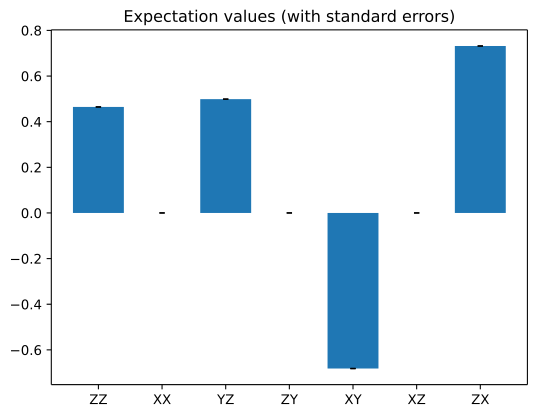
Qiskit에는 Estimator 결과를 플롯하는 내장 함수가 없지만, Matplotlib의 bar 플롯을 사용하여 빠르게 시각화할 수 있습니다.
다음 셀은 양자 상태에서 7가지 서로 다른 관측값(observable)의 기댓값을 추정하는 예제입니다.
import numpy as np
from qiskit import QuantumCircuit
from qiskit.quantum_info import SparsePauliOp
from qiskit.primitives import StatevectorEstimator as Estimator
from qiskit.transpiler import generate_preset_pass_manager
from matplotlib import pyplot as plt

# Simple estimation experiment to create results
qc = QuantumCircuit(2)
qc.h(0)
qc.crx(1.5, 0, 1)

observables_labels = ["ZZ", "XX", "YZ", "ZY", "XY", "XZ", "ZX"]
observables = [SparsePauliOp(label) for label in observables_labels]

pm = generate_preset_pass_manager(optimization_level=1)
isa_circuit = pm.run(qc)
isa_observables = [
    operator.apply_layout(isa_circuit.layout) for operator in observables
]

# Reshape observable array for broadcasting
reshaped_ops = np.fromiter(isa_observables, dtype=object)
reshaped_ops = reshaped_ops.reshape((7, 1))

estimator = Estimator()
job = estimator.run([(isa_circuit, reshaped_ops)])
result = job.result()[0]
exp_val = job.result()[0].data.evs
print(result)

# Since the result array is structured as a 2D array where each element is a
# list containing a single value, you need to flatten the array.

# Plot using Matplotlib
plt.bar(observables_labels, exp_val.flatten())
PubResult(data=DataBin(evs=np.ndarray(<shape=(7, 1), dtype=float64>), stds=np.ndarray(<shape=(7, 1), dtype=float64>), shape=(7, 1)), metadata={'target_precision': 0.0, 'circuit_metadata': {}})
<BarContainer object of 7 artists>

다음 셀은 각 결과의 추정된 표준 오차를 사용하여 오차 막대로 추가합니다. 플롯에 대한 전체 설명은 bar 플롯 문서를 참조하세요.
standard_error = job.result()[0].data.stds

_, ax = plt.subplots()
ax.bar(
    observables_labels,
    exp_val.flatten(),
    yerr=standard_error.flatten(),
    capsize=2,
)
ax.set_title("Expectation values (with standard errors)")
Text(0.5, 1.0, 'Expectation values (with standard errors)')