QRMI로 양자 워크로드 실행하기
사용량 추정치: SQD 섹션에서 IBM Quantum® 하드웨어로 1분 미만. 이 추정치에는 대기 시간과 고전 처리 시간이 포함되지 않으며, 실제 실행 시간은 다를 수 있습니다.
학습 성과
-
HPC 스케줄러와 IBM Quantum 하드웨어 사이의 미들웨어로서 QRMI가 하는 역할
-
실제 IBM® 백엔드에서 핵심 QRMI 라이프사이클(
acquire→task_start→task_status→task_result→release)을 사용하는 방법 -
QRMI 위에 구축된 상위 수준의 Qiskit
SamplerV2및QRMIService래퍼를 사용하는 방법 -
HPC 스케줄러(Slurm)가 환경 변수를 통해 양자 리소스를 주입하는 방법과 애플리케이션이 이를 사용하는 방법
-
QRMI를 통해 IBM 하드웨어를 사용하여 N에 대한 완전한 SQD(Sample-based Quantum Diagonalization) 화학 워크플로를 실행하는 방법
사전 요구 사항
-
Python 가상 환경 및 양자 화학에 대한 기본적인 이해
배경
양자-HPC 통합의 과제
고성능 컴퓨팅(HPC) 워크플로는 종종 고전 컴퓨팅 클러스터와 양자 처리 장치(QPU) 간의 원활한 조정을 필요로 해요. 서로 다른 양자 하드웨어 백엔드와 서비스는 각기 다른 인증 메커니즘, 전송 형식, 작업 라이프사이클 API를 노출해요. IBM Quantum 시스템을 HPC 워크로드 관리자(예: Slurm)에 통합하려면 리소스 확보, 작업 실행, 세션 관리를 위한 깔끔하고 표준화된 인터페이스가 필요해요.
QRMI란 무엇인가
**양자 리소스 관리 인터페이스(Quantum Resource Management Interface, QRMI)**는 HPC 스케줄러와 고전 애플리케이션에서 양자 하드웨어에 대한 접근을 표준화하는, Rust로 작성된 미들웨어 라이브러리예요. QRMI는 단일 통합 라이프사이클 API를 제공해요:
┌─────────────────────────────────────────────────────────────────┐
│                     HPC Application Layer                       │
│          (Slurm job script / Python workflow / CUDA-Q)          │
└───────────────────────────┬─────────────────────────────────────┘
                            │  QRMI API
                            │  acquire() / task_start() / task_result() / release()
┌───────────────────────────▼─────────────────────────────────────┐
│                        QRMI Core (Rust)                         │
│            Python bindings · C bindings · Lua bindings          │
└───────────────────────────┬─────────────────────────────────────┘
                            │
               IBM Quantum Compute Service / IBM Quantum System
QRMI는 github.com/qiskit-community/qrmi에서 오픈소스 프로젝트로 공개되어 있으며, 개요 논문 arXiv:2506.10052에서 설명하고 있습니다.
주요 설계 선택
회로 컴파일이 아닌 리소스 라이프사이클. QRMI는 확보(acquire)/제출(submit)/폴링(poll)/해제(release) 라이프사이클만 처리합니다. 회로 컴파일, 최적화, 트랜스파일은 애플리케이션 계층(예: Qiskit)에 남아 있습니다. 이를 통해 인터페이스는 최소한이면서도 조합 가능하게 유지됩니다.
공급업체 이식성 모델. QRMI는 지원되는 하드웨어 백엔드 전반에 걸쳐 공통 작업 관리 호출(acquire, task_start, task_status, task_result, release)을 제공하지만, 공급업체를 변경하려면 애플리케이션 계층에서 서로 다른 컴파일 패스, 공급업체별 페이로드 구성, 결과 디코딩이 필요합니다.
네이티브 IBM 페이로드 형식. IBM Quantum 백엔드의 경우, QRMI는 Qiskit Runtime 스키마를 따르는 OpenQASM 3 JSON 페이로드(QiskitPrimitive)를 사용해요.
환경 변수를 통한 구성. 자격 증명과 엔드포인트 URL은 런타임에 환경 변수에서 읽어옵니다. HPC 클러스터에서는 작업이 디스패치될 때 Slurm QRMI SPANK 플러그인이 이를 자동으로 설정합니다. 노트북이나 대화형 세션에서는 .env 파일에서 이를 로드합니다. 애플리케이션 코드에는 자격 증명이나 엔드포인트 URL이 하드코딩되어 있지 않습니다.
GRES를 통한 HPC 스케줄러 통합. Slurm 작업이 QRMI SPANK 플러그인 인터페이스(#SBATCH --gres=qpu:1 및 #SBATCH --qpu=ibm_kingston)를 사용하여 양자 리소스를 요청하면, 플러그인은 QRMI_JOB_QPU_RESOURCES와 QRMI_JOB_QPU_TYPES를 작업 환경에 주입합니다. 애플리케이션은 get_job_qpu_resources_and_types()를 호출하여 어떤 리소스가 할당되었는지 확인합니다 — 백엔드 이름을 하드코딩할 필요가 없습니다. QRMIService는 Qiskit 사용자를 위해 이 패턴을 래핑합니다.
핵심 API 호출
| 호출 | 목적 |
|---|---|
qrmi.acquire() | 리소스에 대한 접근 권한을 확보(예: 전용 세션 열기); 잠금 토큰을 반환함 |
qrmi.target() | 백엔드 기능(큐비트, 게이트, 커플링 맵)을 JSON으로 조회함 |
qrmi.task_start(payload) | 양자 작업을 제출함; 작업 ID를 반환함 |
qrmi.task_status(job_id) | 작업 상태(Queued, Running, Completed, Failed)를 폴링함 |
qrmi.task_result(job_id) | 완료된 작업 결과를 원시 JSON 문자열로 조회함 |
qrmi.task_stop(job_id) | 작업을 취소하거나 정리함 |
qrmi.release(lock) | 리소스 잠금을 해제함(예: 세션 닫기) |
이 튜토리얼에서 다루는 내용
이 튜토리얼은 두 부분으로 구성되어 있습니다:
1~3단계(소규모 예제): IBM Quantum 하드웨어에서 간단한 벨 상태 회로 시연을 통해 QRMI API를 소개하며, 저수준 프리미티브의 직접 사용법과 고수준 QRMIService 및 SamplerV2 통합을 함께 다뤄요.
대규모 하드웨어 예제: 결합 거리 1.0 의 N 분자(cc-pVDZ 기저 활성 공간, 26개의 공간 궤도 / 52개의 큐비트)에 대한 완전한 SQD 워크플로로, QRMI를 통해 IBM Quantum 하드웨어에서 실행됩니다. SQD는 ffsim으로 구성된 LUCJ 앤자츠의 양자 샘플링과 qiskit-addon-sqd를 이용한 자기 일관적 구성 복구를 결합합니다.
# Added by doQumentation — installs the packages this notebook needs if they are missing
import importlib.util

_needed = {"dotenv": "python-dotenv", "ffsim": "ffsim", "matplotlib": "matplotlib", "numpy": "numpy", "pyscf": "pyscf", "qiskit": "qiskit", "qiskit_addon_sqd": "qiskit-addon-sqd", "qrmi": "qrmi"}
_missing = [pip for module, pip in _needed.items()
            if importlib.util.find_spec(module) is None]
# One at a time, so a package that fails to install does not block the others
for _pip in _missing:
    %pip install -q {_pip}
if not _missing:
    print("\u2713 All required packages are installed")
요구 사항
이 튜토리얼을 시작하기 전에 다음이 설치되어 있는지 확인하세요.
Python 환경 설정
PyPI에는 Linux용으로 사전 빌드된 바이너리 휠(wheel)이 제공되므로, Linux/HPC 시스템에서는 표준 pip install이 바로 작동합니다.
python3 -m venv ~/.venvs/qrmi-ibm
source ~/.venvs/qrmi-ibm/bin/activate
python -m pip install "qrmi[ibm]" python-dotenv pyscf ffsim qiskit-addon-sqd matplotlib ipykernel
python -m ipykernel install --user --name qrmi-ibm --display-name "QRMI IBM"
pip이 소스에서 QRMI를 빌드하는 경우, 최신 Rust 툴체인(Rust ≥ 1.91.1, rustup.rs의 rustup을 통해 설치)이 있는지 확인하세요.
Jupyter에서 QRMI IBM 커널을 선택한 다음 다시 시작하고 노트북 셀을 순서대로 실행하세요. 저장된 출력은 기여자의 하드웨어 실행 결과이며, 설치 명령에는 해당 실행에서 사용된 정확한 버전이 명시되어 있지 않습니다.
필요한 자격 증명
- IBM Quantum: IBM Quantum Platform에서 발급받은 IAM API 키 및 서비스 CRN
독립 실행의 경우, 이 노트북 옆에 아래 값으로 .env 파일을 만들고, 자격 증명 자리 표시자는 실제 값으로 바꾸세요. 이 파일은 비공개로 유지하세요. 다른 백엔드를 선택하는 경우 이름과 환경 변수 접두사를 모두 업데이트해야 합니다.
ibm_kingston_QRMI_IBM_QCS_ENDPOINT=https://quantum.cloud.ibm.com/api/v1
ibm_kingston_QRMI_IBM_QCS_IAM_ENDPOINT=https://iam.cloud.ibm.com
ibm_kingston_QRMI_IBM_QCS_IAM_APIKEY=<your-iam-api-key>
ibm_kingston_QRMI_IBM_QCS_SERVICE_CRN=<your-crn-starting-with-crn:v1:>
ibm_kingston_QRMI_IBM_QCS_SESSION_MODE=dedicated
ibm_kingston_QRMI_IBM_QCS_SESSION_MAX_TTL=28800
QRMI_JOB_QPU_RESOURCES=ibm_kingston
QRMI_JOB_QPU_TYPES=ibm-quantum-compute-service
Slurm 할당의 경우, 클러스터에서 제공하는 리소스 설정과 자격 증명을 사용하세요. 노트북은 기존 환경 값을 그대로 유지합니다.
설정
의존성을 임포트하고 리소스 구성을 로드합니다.
import os
import time
import json
import numpy as np
from dotenv import load_dotenv

from qrmi import (
    QuantumResource,
    ResourceType,
    Payload,
    TaskStatus,
    get_job_qpu_resources_and_types,
)
from qrmi.primitives import QRMIService
from qrmi.primitives.ibm import SamplerV2, get_target

from qiskit import QuantumCircuit, qasm3
from qiskit.circuit.library import efficient_su2
from qiskit.primitives.containers.sampler_pub import SamplerPub
from qiskit.transpiler.preset_passmanagers import generate_preset_pass_manager

# Load credentials from .env without overriding already-set scheduler environment variables
load_dotenv(override=False)

# Preserve resources if injected by Slurm SPANK plugin; fallback to default for interactive run
BACKEND_NAME = os.environ.get("QRMI_JOB_QPU_RESOURCES", "ibm_kingston")
os.environ.setdefault("QRMI_JOB_QPU_RESOURCES", BACKEND_NAME)
os.environ.setdefault("QRMI_JOB_QPU_TYPES", "ibm-quantum-compute-service")

print(f"Backend: {BACKEND_NAME}")
print("Environment ready.")
Backend: ibm_kingston
Environment ready.
소규모 예제
1~3단계에서는 간단한 회로를 사용해 QRMI API를 소개해요. 각 단계는 IBM Quantum 하드웨어에 대한 QRMI 라이프사이클의 핵심 단계에 대응해요.
이러한 초기 단계의 페이로드는 빠르고 저렴하게 실행할 수 있도록 선택된 작은 벨 상태 회로입니다.
이 예제들은 원격 리소스 할당과 작업 관리를 보여주기 위해 하드웨어를 사용해요. 로컬 회로 시뮬레이터로는 QRMI 서비스와 스케줄러 통합을 검증할 수 없어요. 이 노트북을 실행하면 IBM Quantum 작업이 제출되며, 구성된 백엔드에 대한 접근 권한이 필요해요.
1단계: 고전 문제를 양자 리소스에 매핑하기
모든 QRMI 워크플로의 첫 번째 단계는 QuantumResource 객체를 생성하고 접근 가능한지 확인하는 거예요.
get_target()은 백엔드의 하드웨어 설명(큐비트 수, 기본 게이트, 커플링 맵)을 조회하여 Qiskit Target 객체로 패키징하며, 이는 2단계에서 트랜스파일러가 사용해요.
2단계: 양자 하드웨어 실행을 위해 문제 최적화하기
제출하기 전에, 1단계에서 조회한 Target 객체를 사용하여 Qiskit으로 회로를 백엔드의 명령어 집합 아키텍처(ISA)에 맞게 트랜스파일해요.
그런 다음 예제는 OpenQASM 3 회로 문자열과 작업 메타데이터를 IBM 프리미티브 스키마로 감싸는 Payload.QiskitPrimitive를 생성합니다.
3단계: QRMI 프리미티브를 사용하여 실행하기
페이로드가 만들어지면 예제는 작업을 제출하고 완료될 때까지 폴링합니다. task_start()는 즉시 작업 ID를 반환하며, task_status()는 상태가 더 이상 Queued/Running이 아닐 때까지 폴링됩니다. 결과는 원시 JSON 문자열로 조회되어 측정 샘플을 추출하기 위해 파싱됩니다.
다음 셀은 확보(acquisition), 실행, 정리를 함께 유지하여, 확보 이후 실패가 발생하더라도 노트북이 소유한 세션이 해제되도록 합니다.
# ── IBM Quantum ───────────────────────────────────────────────────────
qrmi = QuantumResource(BACKEND_NAME, ResourceType.IBMQuantumComputeService)
# ResourceType.IBMQuantumSystem is the alternative for directly provisioned systems

print(f"Resource id:   {qrmi.resource_id()}")
print(f"Resource type: {qrmi.resource_type()}")
print(f"Accessible:    {qrmi.is_accessible()}")

# Acquire exclusive access — open try/finally immediately so every
# subsequent failure (target retrieval, transpilation, submission) is covered.
# Release is skipped when running under Slurm: the SPANK plugin owns the
# session lifecycle and will release it when the job finishes.
lock = qrmi.acquire()
print(f"Lock token:    {lock}")
try:
    # Retrieve backend capabilities
    transpiler_target = get_target(
        qrmi
    )  # calls qrmi.target() and parses the JSON
    target_json = json.loads(qrmi.target().value)
    config = target_json.get("configuration", {})
    print(f"\nBackend: {config.get('backend_name', 'unknown')}")
    print(f"Qubits:  {config.get('n_qubits', 'unknown')}")
    print(f"Gates:   {config.get('basis_gates', [])}")

    # ── IBM Quantum ───────────────────────────────────────────────────

    # Build a Bell state circuit
    qc = QuantumCircuit(2)
    qc.h(0)
    qc.cx(0, 1)
    qc.measure_all()
    print(qc.draw("text"))

    # Transpile to ISA using the target retrieved in Step 1
    pm = generate_preset_pass_manager(
        optimization_level=1, target=transpiler_target
    )
    isa_circuit = pm.run(qc)
    print(f"\nTranspiled gate counts: {isa_circuit.count_ops()}")

    # Build the QRMI payload
    # Payload.QiskitPrimitive wraps the IBM SamplerV2 input schema:
    #   pubs: list of [qasm3_string, parameter_values]  (shots goes at top level)
    #   program_id: "sampler" or "estimator"
    shots = 1024
    pub = SamplerPub.coerce((isa_circuit,), shots)
    qasm3_str = qasm3.dumps(
        pub.circuit,
        disable_constants=True,
        allow_aliasing=True,
        experimental=qasm3.ExperimentalFeatures.SWITCH_CASE_V1,
    )
    # Parameter values as a flat list (empty for non-parametric circuits)
    param_array = pub.parameter_values.as_array(
        pub.circuit.parameters
    ).tolist()

    input_json = {
        "pubs": [
            [qasm3_str, param_array]
        ],  # list-of-lists; shots at top level
        "version": 2,
        "support_qiskit": False,  # True returns binary-encoded Qiskit result
        "shots": shots,
    }
    payload = Payload.QiskitPrimitive(
        input=json.dumps(input_json), program_id="sampler"
    )
    print("Payload ready")

    # ── IBM Quantum ───────────────────────────────────────────────────

    # Submit the job
    job_id = qrmi.task_start(payload)
    print(f"Job submitted: {job_id}")

    # Poll until complete
    while True:
        status = qrmi.task_status(job_id)
        print(f"  Status: {status}")
        if status not in [TaskStatus.Running, TaskStatus.Queued]:
            break
        time.sleep(5)

    print(f"\nFinal status: {status}")

    # Retrieve results
    # support_qiskit=False → plain JSON; parse directly without ResultDecoder
    if status == TaskStatus.Completed:
        raw = qrmi.task_result(job_id).value
        result = json.loads(raw)
        # IBM QCS plain-JSON result shape: {"results": [{"data": {"meas": {"samples": [...]}}}]}
        # samples is a list of hex-encoded integers; decode to zero-padded bitstrings
        samples = result["results"][0]["data"]["meas"]["samples"]
        num_bits = sum(reg.size for reg in isa_circuit.cregs)
        from collections import Counter

        counts = Counter(format(int(s, 16), f"0{num_bits}b") for s in samples)
        print(f"\nMeasurement counts: {dict(counts.most_common(8))}")
        qrmi.task_stop(job_id)
    else:
        print(f"Job did not complete. Logs:\n{qrmi.task_logs(job_id)}")

finally:
    # Release only in interactive sessions; under Slurm the SPANK plugin
    # manages the session lifecycle and calling release() here would
    # prematurely close a session it does not own.
    if not os.environ.get("SLURM_JOB_ID"):
        qrmi.release(lock)
        print("\nSession released.")
Resource id:   ibm_kingston
Resource type: ResourceType.IBMQuantumComputeService
Accessible:    True
Lock token:    2ff43011-aed1-4436-a4df-40f37ec588b7

Backend: ibm_kingston
Qubits:  156
Gates:   ['cz', 'id', 'rx', 'rz', 'rzz', 'sx', 'x', 'xslow']
        ┌───┐      ░ ┌─┐
   q_0: ┤ H ├──■───░─┤M├───
        └───┘┌─┴─┐ ░ └╥┘┌─┐
   q_1: ─────┤ X ├─░──╫─┤M├
             └───┘ ░  ║ └╥┘
meas: 2/══════════════╩══╩═
                      0  1

Transpiled gate counts: OrderedDict([('rz', 6), ('sx', 3), ('measure', 2), ('cz', 1), ('barrier', 1)])
Payload ready
Job submitted: dai43g8mhr3c73e7a7o0
  Status: TaskStatus.Queued
  Status: TaskStatus.Running
  Status: TaskStatus.Completed

Final status: TaskStatus.Completed

Measurement counts: {'11': 487, '00': 254, '01': 177, '10': 106}

Session released.
고수준 Qiskit 인터페이스: QRMIService와 SamplerV2
위에서 살펴본 원시 라이프사이클은 모든 호출에 대한 명시적 제어를 제공합니다. 표준 Qiskit 워크플로의 경우, QRMI는 BaseSamplerV2를 구현하는 SamplerV2 프리미티브를 제공합니다.
SamplerV2는 페이로드 직렬화, 제출(task_start), 폴링, 결과 디코딩을 처리합니다. HPC 배치 환경(예: Slurm)에서는 할당과 해제가 스케줄러와 SPANK 플러그인에 의해 관리됩니다. 저수준 API 객체를 직접 사용하는 대화형 Python 세션에서는 acquire()와 release()를 사용하여 전용 세션을 명시적으로 관리할 수 있습니다.
# QRMIService reads QRMI_JOB_QPU_RESOURCES / QRMI_JOB_QPU_TYPES set in Setup or Slurm
service = QRMIService()
qrmi_svc = service.resources()[0]
print(f"Using: {qrmi_svc.resource_id()} ({qrmi_svc.resource_type()})")

# Build an EfficientSU2 circuit
circuit = efficient_su2(5, entanglement="linear")
circuit.measure_all()
param_values = np.random.rand(circuit.num_parameters)

pm = generate_preset_pass_manager(
    optimization_level=1, target=get_target(qrmi_svc)
)
isa_circuit = pm.run(circuit)

# SamplerV2 executes jobs against the QRMI resource and decodes results into primitive containers
sampler = SamplerV2(qrmi_svc, options={"default_shots": 1024})
job = sampler.run([(isa_circuit, param_values)])
print(f"Job ID: {job.job_id()} | Status: {job.status()}")

# Poll with retry — re-raise immediately on permanent failures;
# only retry on transient network/timeout errors (connection resets, 503s).
_TRANSIENT = (
    "503",
    "Service Unavailable",
    "ConnectionError",
    "TimeoutError",
    "timed out",
    "Connection reset",
)
result = None
for attempt in range(60):
    try:
        result = job.result()  # blocks until complete
        break
    except Exception as e:
        if not any(tok in str(e) for tok in _TRANSIENT):
            raise
        print(f"  Transient error on attempt {attempt + 1}: {e}")
        time.sleep(10)

if result is not None:
    counts = result[0].data.meas.get_counts()
    print(f"Counts (first 5): {dict(list(counts.items())[:5])}")
else:
    print("Job did not complete after retries.")

if job.errored():
    print(f"Logs:\n{job.logs()}")
Using: ibm_kingston (ResourceType.IBMQuantumComputeService)
Job ID: dai43jj9k43c73afhrhg | Status: JobStatus.QUEUED
Counts (first 5): {'00010': 66, '00100': 28, '11000': 71, '00110': 23, '10100': 14}
HPC 맥락: Slurm 리소스 주입
HPC 클러스터에서는 사용자가 Slurm GRES 구문과 QRMI SPANK 플러그인 옵션을 함께 사용하여 양자 리소스를 요청합니다. 플러그인은 자격 증명과 리소스 주입을 자동으로 처리합니다:
#SBATCH --gres=qpu:1
#SBATCH --qpu=ibm_kingston
python my_workflow.py   # QRMI_JOB_QPU_RESOURCES and QRMI_JOB_QPU_TYPES are already set
애플리케이션 코드는 런타임에 할당된 리소스를 확인합니다 — 백엔드 이름을 하드코딩할 필요가 없습니다:
# get_job_qpu_resources_and_types() reads QRMI_JOB_QPU_RESOURCES / QRMI_JOB_QPU_TYPES
# set by the Slurm SPANK plugin (or manually above in Setup)
qpus, qpu_types = get_job_qpu_resources_and_types()
print("Resources allocated by scheduler:")
for qpu, qpu_type in zip(qpus, qpu_types):
    print(f"  {qpu}  ({qpu_type})")

# QRMIService wraps this into a list of ready QuantumResource objects
for r in QRMIService().resources():
    print(
        f"\nQRMIService found: {r.resource_id()}  accessible={r.is_accessible()}"
    )
Resources allocated by scheduler:
  ibm_kingston  (ibm-quantum-compute-service)

QRMIService found: ibm_kingston  accessible=True
대규모 하드웨어 예제: N에 대한 SQD
여기서는 모든 구성 요소를 결합하여 더 큰 규모의 완전한 양자 화학 워크플로를 만들고, 이를 QRMI를 통해 실제 IBM Quantum 하드웨어에서 실행합니다.
SQD는 다음을 결합합니다:
ffsim을 사용하여 구성되고 CCSD 진폭으로 초기화된 국소 유니터리 클러스터 야스트로(Local Unitary Cluster Jastrow, LUCJ) 앤자츠의 양자 샘플링generate_lucj_pass_manager를 통한 헤비-헥스 격자 토폴로지에 맞춘 하드웨어 인식 트랜스파일QRMIService와 QRMISamplerV2로 관리되는 IBM Quantum 하드웨어에서의 샘플링 실행- 고전적 후처리:
qiskit-addon-sqd를 이용한 자기 일관적 구성 복구 및 반복적 부분공간 대각화
결합 거리 1.0 에서 cc-pVDZ 기저 집합에서 유도된 활성 공간(26개의 공간 궤도, 52개의 스핀 궤도/큐비트에 해당)을 사용하여 N에 SQD를 적용합니다.
N /cc-pVDZ 활성 공간에 대한 기준 에너지(결합 거리 1.0 ):
- 기준 에너지(별도의 SCI 계산): −109.22802922 Ha
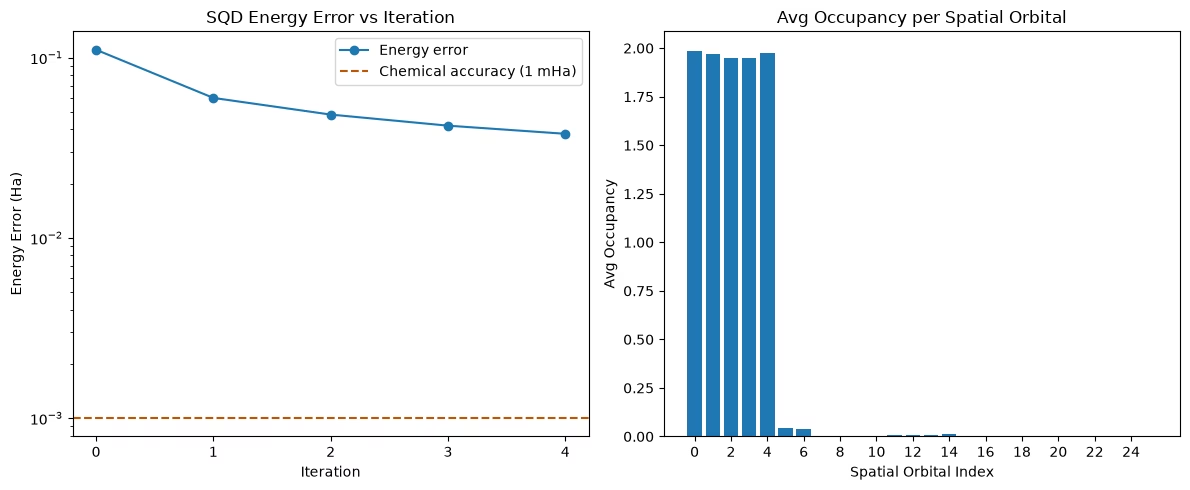
아래의 SQD 실행은 IBM Quantum 하드웨어에서 QRMI를 사용한 종단 간(end-to-end) 실행이 성공적으로 이루어졌음을 보여줍니다. 단일 LUCJ 반복과 100,000샷을 사용한 결과는 기준 에너지보다 약 23.7 kcal/mol 높게 끝나며, 화학적 정확도(≤ 1 kcal/mol)에는 도달하지 못합니다. n_reps, 샷 수, 또는 SQD 반복 횟수를 변경하면 정확도가 개선될 수 있지만, 추가적인 테스트가 필요합니다.
저장된 실행에서는 백엔드가 이를 수용할 수 없었기 때문에 ffsim 패스 매니저가 반대 스핀 상호작용 (24, 24)와 (20, 20)을 제거했어요. 보고된 결과는 이렇게 조정된 회로를 사용해요.
from qrmi.primitives.ibm import get_backend
import math
import os
import time
from functools import partial
from dotenv import load_dotenv
import numpy as np
import matplotlib.pyplot as plt

import pyscf
import pyscf.gto
import pyscf.scf
import pyscf.cc
import pyscf.mcscf
import pyscf.ao2mo

import ffsim
import ffsim.qiskit
from qiskit import QuantumCircuit, QuantumRegister
from qiskit_addon_sqd.fermion import (
    SCIResult,
    diagonalize_fermionic_hamiltonian,
    solve_sci_batch,
)
from qrmi.primitives import QRMIService
from qrmi.primitives.ibm import SamplerV2, get_target

load_dotenv(override=False)
os.environ.setdefault("QRMI_JOB_QPU_RESOURCES", "ibm_kingston")
os.environ.setdefault("QRMI_JOB_QPU_TYPES", "ibm-quantum-compute-service")

# ── Step 1: Map classical inputs to a quantum problem ─────────────────

# Build N2 molecule at 1.0 Å bond distance
mol = pyscf.gto.Mole()
mol.build(
    atom=[["N", (0, 0, 0)], ["N", (1.0, 0, 0)]],
    basis="cc-pvdz",
    symmetry="Dooh",
)

# Define active space: freeze 2 core orbitals
n_frozen = 2
active_space = range(n_frozen, mol.nao_nr())

# Get molecular integrals
scf = pyscf.scf.RHF(mol).run()
norb = len(active_space)
n_electrons = int(sum(scf.mo_occ[active_space]))
n_alpha = (n_electrons + mol.spin) // 2
n_beta = (n_electrons - mol.spin) // 2
nelec = (n_alpha, n_beta)

cas = pyscf.mcscf.CASCI(scf, norb, nelec)
mo = cas.sort_mo(active_space, base=0)
hcore, nuclear_repulsion_energy = cas.get_h1cas(mo)
eri = pyscf.ao2mo.restore(1, cas.get_h2cas(mo), norb)

# Reference energy from external SCI calculation
reference_energy = -109.22802921665716

print(
    f"N₂/cc-pVDZ active space: {norb} orbitals ({2 * norb} qubits), {nelec} electrons"
)
print(f"SCF energy:       {scf.e_tot:.8f} Ha")
print(f"Reference energy: {reference_energy:.8f} Ha")

# Get CCSD amplitudes for initializing the LUCJ ansatz
ccsd = pyscf.cc.CCSD(
    scf, frozen=[i for i in range(mol.nao_nr()) if i not in active_space]
).run()
t1 = ccsd.t1
t2 = ccsd.t2
print(f"CCSD energy:      {ccsd.e_tot:.8f} Ha")

# Discover backend via QRMIService (QRMI_JOB_QPU_RESOURCES set in Setup)
service = QRMIService()
qrmi_sqd = service.resources()[0]
print(f"Using QRMI resource: {qrmi_sqd.resource_id()}")

# get_backend() wraps the QRMI resource as a Qiskit backend for layout synthesis

backend = get_backend(qrmi_sqd)

# Set ansatz properties
n_reps = 1
pairs_aa = [(p, p + 1) for p in range(norb - 1)]
pairs_ab = None

# Create pass manager adapted to hardware heavy-hex topology
pass_manager, pairs_ab = ffsim.qiskit.generate_lucj_pass_manager(
    backend=backend,
    norb=norb,
    connectivity="heavy-hex",
    interaction_pairs=(pairs_aa, pairs_ab),
    optimization_level=3,
)

# Create the compressed LUCJ ansatz operator
ucj_op = ffsim.UCJOpSpinBalanced.from_t_amplitudes(
    t2=t2,
    t1=t1,
    n_reps=n_reps,
    interaction_pairs=(pairs_aa, pairs_ab),
    optimize=True,
    options=dict(maxiter=1000),
)

# Assemble the circuit
qubits = QuantumRegister(2 * norb, name="q")
circuit = QuantumCircuit(qubits)
circuit.append(ffsim.qiskit.PrepareHartreeFockJW(norb, nelec), qubits)
circuit.append(ffsim.qiskit.UCJOpSpinBalancedJW(ucj_op), qubits)
circuit.measure_all()
print(f"LUCJ circuit: {circuit.num_qubits} qubits, depth {circuit.depth()}")

# ── Step 2: Optimize for quantum hardware execution ───────────────────

isa_circuit = pass_manager.run(circuit)
print(f"Transpiled gate counts: {isa_circuit.count_ops()}")

# ── Step 3: Execute using Qiskit primitives (QRMI SamplerV2) ─────────

sampler = SamplerV2(qrmi_sqd, options={"default_shots": 100_000})
# sampler.options.environment.job_tags = ["TUT_SQD"]
job = sampler.run([(isa_circuit,)])
print(f"Job submitted via QRMI: {job.job_id()} | Status: {job.status()}")
print("Waiting for results from hardware...")

_TRANSIENT = (
    "503",
    "Service Unavailable",
    "ConnectionError",
    "TimeoutError",
    "timed out",
    "Connection reset",
)
primitive_result = None
for attempt in range(120):
    try:
        primitive_result = job.result()
        break
    except Exception as e:
        if not any(tok in str(e) for tok in _TRANSIENT):
            raise
        print(f"  Transient error on attempt {attempt + 1}: {e}")
        time.sleep(10)

if primitive_result is None:
    raise RuntimeError("Job did not complete after retries")

pub_result = primitive_result[0]
bit_array = pub_result.data.meas
print(f"Total shots collected: {bit_array.num_shots}")

# ── Step 4: Post-process and return result in classical format ────────

def is_valid_bitstring(
    bitstring: str, norb: int, nelec: tuple[int, int]
) -> bool:
    n_a, n_b = nelec
    return (
        len(bitstring) == 2 * norb
        and bitstring[norb:].count("1") == n_a
        and bitstring[:norb].count("1") == n_b
    )

num_valid = sum(
    is_valid_bitstring(b, norb, nelec) for b in bit_array.get_bitstrings()
)
valid_fraction = num_valid / bit_array.num_shots
expected_random = (
    math.comb(norb, n_alpha) * math.comb(norb, n_beta) / (2 ** (2 * norb))
)
print(f"Fraction of valid configurations sampled: {valid_fraction:.5f}")
print(f"Expected fraction from uniform random:     {expected_random:.4e}")

# Configure SQD eigensolver
energy_tol = 1e-3
occupancies_tol = 1e-3
max_iterations = 5
num_batches = 3
samples_per_batch = 300
symmetrize_spin = True
carryover_threshold = 1e-4
max_cycle = 200

# Hartree-Fock initial occupancy guess
initial_occupancies = (
    np.array([1] * n_alpha + [0] * (norb - n_alpha)),
    np.array([1] * n_beta + [0] * (norb - n_beta)),
)

sci_solver = partial(solve_sci_batch, spin_sq=0.0, max_cycle=max_cycle)
result_history = []

def callback(results: list[SCIResult]):
    result_history.append(results)
    iteration = len(result_history)
    print(f"Iteration {iteration}")
    for i, res in enumerate(results):
        subspace_dim = np.prod(res.sci_state.amplitudes.shape)
        print(
            f"  Subsample {i}: Energy = {res.energy + nuclear_repulsion_energy:.8f} Ha | Subspace dim = {subspace_dim}"
        )

print("\nRunning SQD post-processing...")
rng = np.random.default_rng(42)
sqd_result = diagonalize_fermionic_hamiltonian(
    hcore,
    eri,
    bit_array,
    samples_per_batch=samples_per_batch,
    norb=norb,
    nelec=nelec,
    num_batches=num_batches,
    energy_tol=energy_tol,
    occupancies_tol=occupancies_tol,
    max_iterations=max_iterations,
    sci_solver=sci_solver,
    symmetrize_spin=symmetrize_spin,
    initial_occupancies=initial_occupancies,
    carryover_threshold=carryover_threshold,
    callback=callback,
    seed=rng,
)

final_energy = sqd_result.energy + nuclear_repulsion_energy
energy_error = final_energy - reference_energy

print("\n=== Energy Summary (N₂/cc-pVDZ active space) ===")
print(f"SCF energy:       {scf.e_tot:.8f} Ha")
print(f"Reference energy: {reference_energy:.8f} Ha")
print(f"Final SQD energy: {final_energy:.8f} Ha")
print(
    f"Energy error:     {energy_error:.8f} Ha ({abs(energy_error) * 627.5:.4f} kcal/mol)"
)

# ── Visualization ─────────────────────────────────────────────────────

x1 = range(len(result_history))
min_e = [
    min(res, key=lambda r: r.energy).energy + nuclear_repulsion_energy
    for res in result_history
]
e_diff = [abs(e - reference_energy) for e in min_e]
chem_accuracy = 0.001  # ~1 mHa / ~0.6 kcal/mol

y2 = np.sum(sqd_result.orbital_occupancies, axis=0)
x2 = range(len(y2))

fig, axs = plt.subplots(1, 2, figsize=(12, 5))

# Energies convergence plot
axs[0].plot(x1, e_diff, label="Energy error", marker="o")
axs[0].set_xticks(list(x1))
axs[0].set_xticklabels(list(x1))
axs[0].set_yscale("log")
axs[0].axhline(
    y=chem_accuracy,
    color="#BF5700",
    linestyle="--",
    label="Chemical accuracy (1 mHa)",
)
axs[0].set_title("SQD Energy Error vs Iteration")
axs[0].set_xlabel("Iteration")
axs[0].set_ylabel("Energy Error (Ha)")
axs[0].legend()

# Spatial orbital occupancy plot
axs[1].bar(x2, y2, width=0.8)
axs[1].set_xticks(list(x2)[::2])
axs[1].set_xticklabels(list(x2)[::2])
axs[1].set_title("Avg Occupancy per Spatial Orbital")
axs[1].set_xlabel("Spatial Orbital Index")
axs[1].set_ylabel("Avg Occupancy")

plt.tight_layout()
plt.show()
WARN: Unable to to identify input symmetry using original axes.
Different symmetry axes will be used.

converged SCF energy = -108.929838385609
N₂/cc-pVDZ active space: 26 orbitals (52 qubits), (5, 5) electrons
SCF energy:       -108.92983839 Ha
Reference energy: -109.22802922 Ha
E(CCSD) = -109.2177884185545  E_corr = -0.2879500329450047
CCSD energy:      -109.21778842 Ha
Using QRMI resource: ibm_kingston
LUCJ circuit: 52 qubits, depth 3
Transpiled gate counts: OrderedDict([('sx', 7041), ('rz', 6969), ('cz', 1858), ('measure', 52), ('x', 47), ('barrier', 1)])
Job submitted via QRMI: dai43o0mhr3c73e7a81g | Status: JobStatus.QUEUED
Waiting for results from hardware...
Total shots collected: 100000
Fraction of valid configurations sampled: 0.00319
Expected fraction from uniform random:     9.6079e-07

Running SQD post-processing...
Iteration 1
  Subsample 0: Energy = -109.09341960 Ha | Subspace dim = 208849
  Subsample 1: Energy = -109.11738590 Ha | Subspace dim = 204304
  Subsample 2: Energy = -109.09947704 Ha | Subspace dim = 212521
Iteration 2
  Subsample 0: Energy = -109.16015998 Ha | Subspace dim = 332929
  Subsample 1: Energy = -109.16823702 Ha | Subspace dim = 319225
  Subsample 2: Energy = -109.16189785 Ha | Subspace dim = 336400
Iteration 3
  Subsample 0: Energy = -109.17759299 Ha | Subspace dim = 471969
  Subsample 1: Energy = -109.17937442 Ha | Subspace dim = 512656
  Subsample 2: Energy = -109.17970409 Ha | Subspace dim = 504100
Iteration 4
  Subsample 0: Energy = -109.18410905 Ha | Subspace dim = 608400
  Subsample 1: Energy = -109.18265405 Ha | Subspace dim = 636804
  Subsample 2: Energy = -109.18608430 Ha | Subspace dim = 657721
Iteration 5
  Subsample 0: Energy = -109.18870837 Ha | Subspace dim = 846400
  Subsample 1: Energy = -109.18890818 Ha | Subspace dim = 848241
  Subsample 2: Energy = -109.19022232 Ha | Subspace dim = 804609

=== Energy Summary (N₂/cc-pVDZ active space) ===
SCF energy:       -108.92983839 Ha
Reference energy: -109.22802922 Ha
Final SQD energy: -109.19022232 Ha
Energy error:     0.03780690 Ha (23.7238 kcal/mol)
다음 단계
이 작업이 흥미로웠다면, 다음 자료에도 관심이 있을 수 있습니다:
-
샘플 기반 양자 대각화 튜토리얼 — 더 큰 분자와 기저 집합을 포함한 IBM Quantum Platform의 전체 SQD 화학 워크플로
-
샘플 기반 크릴로프 양자 대각화 — 페르미온 격자 모델에 대해 시간 전개 회로를 사용하는 관련 방법
-
qiskit-addon-sqd문서 — SQD 후처리 라이브러리에 대한 전체 API 참조 및 추가 튜토리얼 -
QRMI GitHub 저장소 — 소스 코드, 추가 백엔드 예제(CUDA-Q, C, Lua)
-
QRMI 개요 논문 — QRMI 아키텍처와 HPC 통합에 대한 기술적 설명
-
IBM Quantum Compute Service 세션 가이드 — IBM 백엔드에 대한 QRMI
acquire/release라이프사이클과 세션의 관계